

What Is a POS System? How It Works and Why It Matters for Your Business
Learn what a POS system is, how it works, the main types, and how to choose the right one for a shop, café or restaurant.
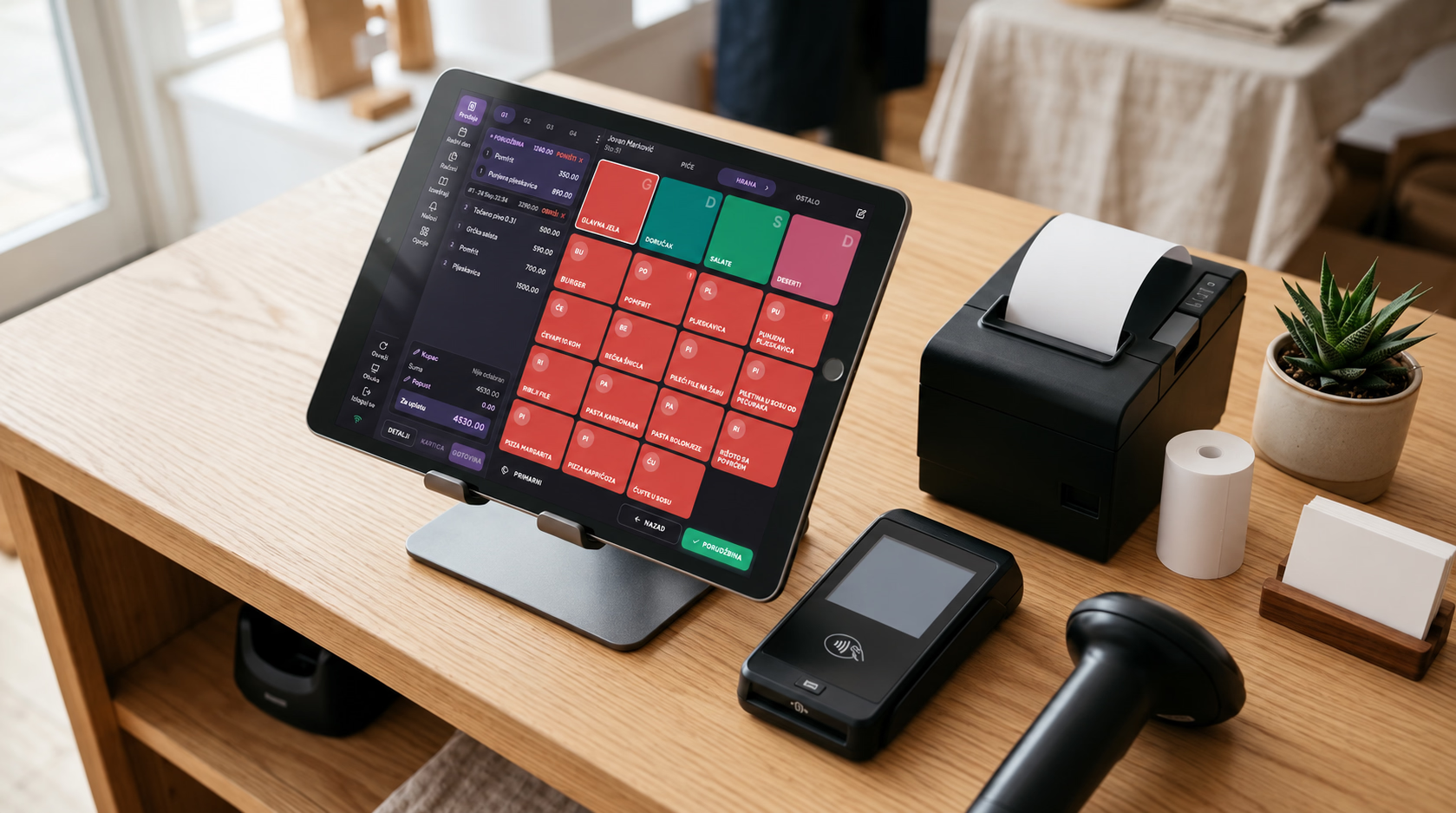
Anyone who has started their own business knows how demanding and overwhelming it is to track every process, and how difficult it is to have a clear picture of where things are going wrong at any given moment.
Things are changing rapidly. Market demands are becoming more complex as it grows. The end customer now knows exactly what they want and has no patience for any mistakes on our end.
This creates a need for technology that simplifies interactions and makes us as efficient as possible. In a sea of information, their coherence and the ability to have them always available is what matters most.
This is where the POS system (point of sale) comes into play.
A POS system can be most simply defined as a combination of hardware and software used to sell a service or product, but a modern POS is much more than that.
In this article, we will explain:
- What a POS system is and what it consists of
- How a POS system works
- The transition from cash registers to POS systems
- Benefits of POS systems
- Types of POS systems
- How POS systems work for hospitality
- How POS systems work for retail
- Frequently asked questions about POS systems
1. What Is a POS System and What Does It Consist Of
When we hear "POS," we mistakenly assume it's just the device that cashiers or waiters use to swipe a credit card to charge for a service or product.
While that is a small part of it, a POS system is far more than that. It's a system that connects all information from different parts of a business and turns it into a clear, usable result.
A POS system is the link between the end customer and the owner, manager, and salesperson.
A modern POS system consists of hardware and software components that are integrated and allow users to track business processes.
POS System Hardware
POS hardware typically includes:
- some type of computer
- a printer for printing fiscal receipts and invoices
- additional equipment
The hardware component is very diverse and fully adaptable to the needs and scale of the business.
For example, larger companies that issue a high volume of receipts most commonly use Windows or Mac computers connected to printers. Smaller companies with limited business space or a priority on mobility often use small portable devices.
Android devices that look like smartphones with an integrated printer are currently very popular on the market.
The specifics of each industry bring specific additional equipment, so we often see:
- barcode scanners for fast item entry in supermarkets, to avoid creating long lines of dissatisfied customers
- kitchen display systems for communication between waiters and chefs in larger restaurants, so food reaches guests faster
- devices with longer battery life for field salespeople, so they don't have to worry about charging frequently
- self-service kiosks in fast food restaurants to reduce queues at the counter
These are just some examples showing how specialized and tailored to user needs POS hardware has become today.
POS System Software
The software component is the brain of the POS system. It handles all processes in the POS system.
It typically consists of two parts:
- back-office
- sales interface
Back-Office
The back-office is the management component designed for managers, and through it you can:
- manage products (price lists, codes or barcodes, tax rates, names)
- manage inventory (receiving and dispatching goods, calculations, material accounting)
- manage employees (working hours, shifts, payroll, privileges)
- generate reports and analytics (revenue reports by various categories)
- CRM (managing all interactions and relationships with current and potential clients, with the goal of increasing sales and business growth)
- integrate with delivery apps, accounting systems, etc.
Sales Interface
The sales interface is used by salespeople, waiters, and cashiers.
Its main functions are:
- processing transactions (sales, advance payments, receipt cancellations, proforma invoices, invoices, e-invoices)
- receipt fiscalization
2. How a POS System Works
A modern POS system functions as an integrated platform that connects hardware (computers, screens, barcode scanners, thermal and regular printers, cash drawers, portable devices, etc.) with software.
During a sale, items are identified by scanning barcodes, entering special codes, or pressing item buttons. The software then applies predefined price lists, tax rates, and discounts, updates inventory levels in real time, and sends a request to issue a fiscal receipt.
In the background, the software tracks all these transactions, which means various reports can be created at any time and a large number of business processes can be managed.
POS systems can integrate with enterprise resource planning systems, accounting software, CRM, loyalty programs, and e-commerce platforms.
3. From Cash Registers to POS Systems – Cloud as the Game Changer
In recent years, especially after the introduction of electronic fiscalization in the region, there has been a massive adoption of POS systems and a gradual disappearance of traditional cash registers.
Computers and Android fiscal devices have replaced old cash registers and enabled much more than just recording sales.
Today, POS systems track a large number of business processes.
Another major trend is the transition of POS systems to cloud solutions.
A cloud POS system stores all its data on the internet and can be accessed from any device with an internet connection.
All information from a cloud POS system is available in real time, from anywhere, at any moment. Even if the device you're currently using stops working, you simply pick up a new one and all data remains saved - you continue working right where you left off.
Want to see how this works in practice?
Konty is a POS system for hospitality and retail. The demo takes 30 minutes and the first 30 days are free, no credit card.
4. Benefits of POS Systems
The following table lists concrete examples of just some of the benefits of POS systems:
| POS System Benefit | Concrete Example |
|---|---|
| Faster transactions | A barcode scanner reduces waiting at the register from 5 minutes to 1 minute. |
| Accurate record keeping | Automatically records every sale and discount, reducing calculation errors. |
| Inventory management | The system alerts when milk stock is low and automatically suggests an order. |
| Financial tracking | Daily sales reports are available immediately, making tax calculations easier. |
| Improved customer experience | Faster card payments and a loyalty program that gives discounts to regular customers. |
| Integration with other systems | Connects to the online shop, so sales in the physical store are automatically reflected in the e-commerce platform. |
| Security and control | Employees cannot return products without manager approval. |
| Analytics and business decisions | The system shows which products sell best on weekends, helping plan promotions and campaigns. |
5. Types of POS Systems by Industry
20 years ago, virtually everyone used the same cash registers, regardless of industry.
Today, the situation is completely different.
POS systems are often developed specifically for a particular industry.
For example:
- hair salon – a small Android device with an integrated printer
- coffee bar – a computer with a water-resistant touchscreen
- large supermarkets – multi-line barcode scanners and fast software
Due to different user needs, POS systems have become highly personalized.
They are most commonly divided into:
- POS systems for hospitality
- POS systems for retail
6. POS Systems for Hospitality
Hospitality POS systems are optimized through their hardware and software for faster order processing and better communication between staff.
Hospitality Hardware
Hospitality hardware typically includes:
- all-in-one computer with a touchscreen
- receipt printer
- kitchen printer
- bar printer
- card payment terminals
- kitchen display screen
- tablets for remote orders
- waiter card readers
Hospitality hardware is often resistant to water, dust, and damage due to the high frequency of use.
Hospitality Software
The software is built for speed and clarity.
The sales interface often features:
- a graphical table layout divided into zones
- large buttons with product images
- product categorization
- clearly differentiated buttons for the most common actions
The back-office typically includes:
- product and price list management
- inventory management
- food and drink ingredient management
- advanced revenue reports
- CRM features
7. POS Systems for Retail
Retail POS systems are optimized for:
- large product databases
- high customer throughput
- fast transaction recording
Retail Hardware
Most commonly includes:
- computer
- receipt printer
- barcode scanner
- A4 printer for wholesale invoices
- cash drawer
- scales
- card payment terminals
Retail Software
The software is clear and optimized for fast item scanning.
The back-office typically includes:
- product and price list management
- inventory management
- goods received and dispatch notes
- advanced reports
- CRM
- supplier database
This category includes several types of POS systems, such as:
- small POS systems for service businesses
- POS systems for wholesale
- e-invoice systems
8. Frequently Asked Questions About POS Systems
Is a POS system the same as a cash register?
A POS system is, among other things, also a cash register. Beyond that function, it has many additional capabilities that enable tracking of goods and service transactions.
Can a POS system work on my computer or smartphone?
The software component of a POS system is often cross-platform and can run on:
- Windows computers
- Mac computers
- Android smartphones
What is e-fiscalization?
E-fiscalization refers to the automatic sending of all transaction receipts from your POS system to the Tax Administration server for validation and fiscalization. It is mandatory in many countries across the region.
Do I need the internet for a POS system to work?
Due to e-fiscalization requirements, an internet connection must be available on the POS system.
You don't need to be constantly online, as most systems have an offline mode, but internet must be available at least once a day for synchronization with the Tax Administration.
How much does a POS system cost?
A POS system consists of hardware and software.
Typical prices are:
Hardware:
- most affordable Android devices: around €250
- more advanced systems: several thousand euros
Software:
- €12–20 per month for retail
- €25–50 per month for hospitality
What should I consider when buying a POS system?
Pay attention to:
- hardware warranty
- licensed software that follows legal regulations
- the reputation of the company selling the POS system
- cloud functionality
- quality of technical support
How difficult is it to learn to use a POS system?
Working with a POS system shouldn't be difficult.
The manufacturer's goal is to make the software intuitive and easy to use.
Training typically takes:
- about 30 minutes for the back-office
- about 20 minutes for the sales interface
Want to learn more about how a POS system can improve your business? Check out Konty for hospitality or Konty for retail.
Got Questions? Contact us.
Fill out the form and our team will get back to you within 24 hours.
Related Articles
Fruti Međaš - Complete Control Over a Chain of Stores with Konty
A beverage wholesaler with 61 employees and a chain of retail stores: how Fruti Međaš gained full control over sales and stock with Konty.
How Aquastar Danube Hotel Connected Reception and Restaurant - Without Paper, Errors, or Delays
With a view of the Danube and a system that works flawlessly behind the scenes, Aquastar Danube shows how a hotel links reception and restaurant without paper.